
Match the colors,
not the channels.
An upscaler brings back more detail and slightly wrong colors. Matching its histograms to the original pulls the colors back, but one channel at a time, and that sees the chroma plane from only two sides: a flat dark blue comes apart into purple blocks. Chroma Rotation Averaging matches along six directions, averages, and repeats.


6 directions3 rotations × 2 axes3 steps, 25 · 50 · 100%CIELAB · OKLab · tiledRust → WebAssembly, running on this pagesince February 2025
The drift
The upscale came back paler.
An upscaler pipeline turns a small image into a large one in several passes. Some resample, some invent detail, some repaint the whole picture at the new size. The detail is the point. The colors change on the way.


The cyans lost a quarter of their saturation, and the dark water came back lighter. The eyes changed too, but that is detail, not color, and no color correction should touch it.
The original is still at hand: it is what went into the upscaler. The standard way to pull colors back to it is histogram matching. For one channel, sort the values of both images and give each pixel of the upscale the value at the same rank in the original: darkest to darkest, median to median. The images need not line up or share a size. Afterwards the channel's histogram is the original's.
The failure
Why did the dark water turn purple?
The usual way to match a color image is in a Lab-type space, one channel at a time: lightness L, then a, then b. Each histogram comes out right. The colors do not have to.


Fig. 03 / The same 240 × 180 pixels at each stage. The corrections are the compiled implementation's, with the lab's defaults: CIELAB, 256 bins.
Two shadows, not the colors
A color is a point on the chroma plane: the direction from gray is its hue, the distance its chroma. Per-channel matching sees that plane only as two shadows, one on the a axis and one on the b axis. Two images can cast the same shadows and hold different colors.
One curve for every pixel
Each channel gets a single curve for the whole image, from the input's values to the reference's. Every pixel with the same b gets the same new b, whatever its a. The slope of the curve is the ratio of the two histograms: where the input is crowded and the reference is not, the curve turns steep and pulls neighboring values apart. The dark water sits on such a stretch.
Near gray, a small push flips the hue
47% vs 11%
of the nearly gray pixels (CIELAB chroma 0.5 to 1) turn more than 90° round the hue circle under per-channel matching, and under CRA. Where a and b are both small, the same shifts carry a color to the other side of gray. Above chroma 2, neither method turns any.
Fig. 04 / The two curves of per-channel matchingDetails
“Technique to reduce bad color shifts (e.g. dark blues turning gray/purple-ish) and banding when histogram matching to a lower res reference.”The first announcement, February 2025[2]
The method
Look from six sides, not two.
If two directions are not enough, look along more. CRA rotates the chroma plane of both images, matches each rotated axis exactly as before, rotates back, and does this at 0°, 30° and 60°: six directions, one every 30°. Each rotation proposes a new place for every pixel, right along its own two directions and blind in between. The average keeps what they agree on.
1 / Rotate
Turn the a, b plane of both images by θ.
2 / Match each axis
Histogram-match the rotated a to the reference's rotated a; the same for b.
3 / Rotate back
Turn the matched plane by −θ. Do it for 0°, 30° and 60°, all from the same start.
4 / Average, blend
Average the three and blend into the image: 25%, then 50%, then 100%.
Then / One final pass
Match L, a and b once, one channel at a time. Lightness is only matched here.
Why no full step
A full match along any pair of axes commits every color to one side of each axis at once, and every step after it is a monotone curve that keeps that order: a color sent the wrong way stays there. Matching a and b in full is per-channel matching. Choosing the axes at random, one full step after another, as iterative distribution transfer does, does not remove the commitment. It only moves the failure somewhere unpredictable.
CRA does not take that step while the colors are still far off. Each step averages the proposals of six directions and moves part of the way, a quarter, then half of the rest, so no single pair of axes decides where a color goes. The only full match along one pair of axes is the last pass, when there is little left to decide.
600 scenes, colors at random, the reference turned 15° to 45°
Synthetic scenes on the chroma plane: two opposing colors, or two to four anywhere, and the same scene turned as the reference, so each color has a known target. A color flips when it lands more than 90° from it. The random-axes method is iterative distribution transfer after Pitié et al., here on the chroma plane. Past 45° every method fails often, CRA least.
Fig. 05 / Step through itDetails
Per-channel matching brings the distance to nothing on its two axes and leaves lobes between them. The first two CRA steps shrink the rose in every direction; the third, the full step, shrinks most of it and evens it out; the final pass pins the axes. Between them, the distance ends at about half of per-channel matching's, and the final pass moves a and b by a fifth of what the steps moved them.
The implementation
Run it on your own pictures.
This is the Rust code of cra-web, compiled to WebAssembly, running in a background worker: decoding with the images' color profiles, correcting in linear light, dithering to 8 bits for the screen. About 750 KB with gzip, loaded when you start it. Your pictures stay in your browser.
Fig. 06 / Grading suiteDetails
Where to look
The dark water first. In CIELAB, per-channel matching breaks it into purple, with bins or without, and CRA keeps it blue. On the rose, per-channel matching is smallest on its two axes and bulges between them.
OKLab
cra-web's default space makes per-channel matching itself much better behaved on this picture: no purple. CRA still pulls the directions between the axes in.
The numbers
Error against the original, from 3.02 for the upscale: per-channel 2.42, CRA 2.31, tiled CRA 2.07 (CIELAB, 256 bins). With 256 bins nothing reaches zero on the axes; a bin is about one CIELAB unit wide.
Settings
One method, three choices.
Around the same rotate, match and average, three things can change: the plane it works on, how much of the picture one curve covers, and how finely the histograms are taken. The suite above has all three.
Which plane
CIELAB, as in the first scripts, or OKLab, which the Rust port added and cra-web has used by default since January 2026. CIELAB is known to bend blues toward purple as their chroma changes at a constant hue angle; OKLab was designed to keep hue straight, and on this picture per-channel matching alone avoids the purple in it. The ranges scale with the space: ±127 in CIELAB, ±0.5 in OKLab. Linear RGB is there to compare: with no chroma plane, CRA turns the whole cube about its gray axis, at 0°, 40° and 80°.
In the suite: Working space
How much of the picture
One curve per direction for the whole picture, or one per region. A cast that changes across the frame needs the second. The tiled form, there from the first scripts, cuts the image into a 9 × 9 grid and corrects 64 overlapping blocks of 2 × 2 tiles, each against the same region of the reference, then blends them with Hamming windows and matches once globally. Lightness comes from the input and is matched globally, or per block with the tiled-luminosity option. It needs a reference of the same scene, which an upscale has.
In the suite: Tiled CRA
How finely
In 256 bins, or with no bins at all. Binning rounds every value, so it has to be dithered, or the rounding bands. The first scripts used a simple Floyd–Steinberg pass and scikit-image. The Rust port has its own matching and dithers properly: with the kernel-switching ditherer[3] and a new seed for every pass, so the noise of the six matchings averages out, or with a and b quantized together by perceptual distance; and once more on the output, back to 8 bits. Without bins it sorts the values themselves and breaks ties with a seeded hash of the position. The bins span a fixed square, so at 30° and 60° they are 1.37 times wider.
In the suite: Histograms
Another use
Any picture can be the reference.
With a different picture as the reference, matching becomes color transfer: the input takes on the reference's palette. Here a Midjourney V6 image of a woman in a city is matched to a Midjourney V3 image of a woman in a park.[1]
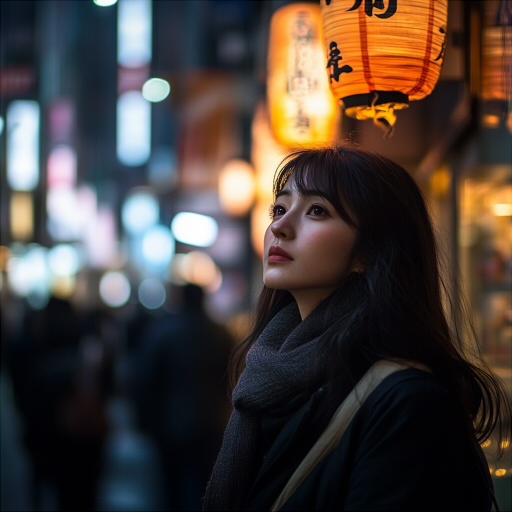
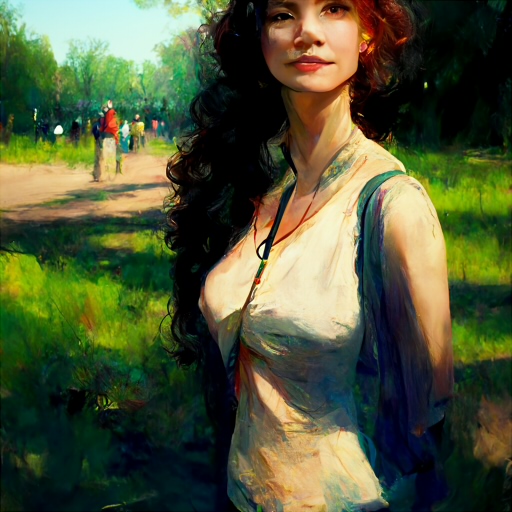
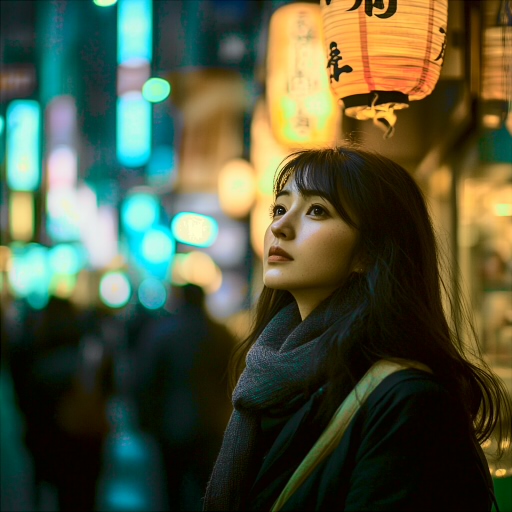
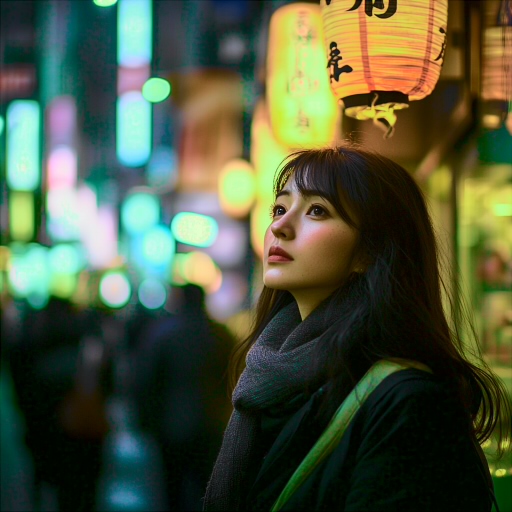
Fig. 07 / As published with the Python scripts in February 2025. Run this pair in the suite above ↑
Use it
Take it into your own pipeline.
cra-web is the whole toolkit: the Rust implementation this page runs, a command-line tool for batch work, and the WebAssembly build, with rescaling and dithering beside it. BSD 3-Clause.
cra-web on GitHub$ cra -i upscale.png -r original.png -o out.png # CRA in OKLab, the default with a reference $ cra -i upscale.png -r original.png --histogram cra-lab -o out.png # in CIELAB, as on this page $ cra -i upscale.png -r original.png --histogram tiled-oklab -o out.png # tiled, for a cast that changes across the frame
References
CRA
- Jan Boon (Kaetemi), chroma-rotation-averaging, GitHub, 2025-02-21. The Python scripts (per-channel, CRA and tiled, in CIELAB), written mostly by DeepSeek R1 and Claude Sonnet and edited by hand; the README with the first description of CRA, by Claude Opus; and the example images. BSD 3-Clause.
- Jan Boon (Kaetemi), posts on X: announcing the technique, 2025-02-23; the first cra-web demo, 2026-01-10.
- Jan Boon (Kaetemi), cra-web, GitHub, 2026. Started on 2026-01-10 as a browser demo of the scripts, built with Claude Code, and ported to Rust and WebAssembly the same day; OKLab, its own histogram matching and the proper dithering followed within four days. The kernel-switching ditherer: “Stochastic Kernel-Switching Error Diffusion,” blog.kaetemi.be, 2026. BSD 3-Clause.
Color transfer
- E. Reinhard, M. Ashikhmin, B. Gooch, P. Shirley, “Color Transfer between Images,” IEEE Computer Graphics and Applications 21(5), 2001, 34–41. doi:10.1109/38.946629.
- L. Neumann, A. Neumann, “Color Style Transfer Techniques using Hue, Lightness and Saturation Histogram Matching,” Computational Aesthetics in Graphics, Visualization and Imaging 2005, Eurographics, 111–122. doi:10.2312/COMPAESTH/COMPAESTH05/111-122.
Distribution transfer and sliced transport
- F. Pitié, A. C. Kokaram, R. Dahyot, “N-Dimensional Probability Density Function Transfer and its Application to Colour Transfer,” ICCV 2005, vol. 2, 1434–1439. doi:10.1109/ICCV.2005.166. Algorithm 1; section 4, the choice of rotations.
- F. Pitié, A. C. Kokaram, R. Dahyot, “Automated Colour Grading Using Colour Distribution Transfer,” Computer Vision and Image Understanding 107(1–2), 2007, 123–137. doi:10.1016/j.cviu.2006.11.011.
- F. Pitié, A. Kokaram, US patent 7,796,812, “Method for matching color in images,” filed 2006-10-17, granted 2010-09-14; expired.
- J. Rabin, G. Peyré, J. Delon, M. Bernot, “Wasserstein Barycenter and Its Application to Texture Mixing,” SSVM 2011, LNCS 6667, Springer, 2012, 435–446. doi:10.1007/978-3-642-24785-9_37.
- N. Bonneel, J. Rabin, G. Peyré, H. Pfister, “Sliced and Radon Wasserstein Barycenters of Measures,” Journal of Mathematical Imaging and Vision 51(1), 2015, 22–45. doi:10.1007/s10851-014-0506-3. Section 4.3, the Newton step (equation 40); section 4.4, Pitié's method as its stochastic form.
The mermaid illustration is made with Polyverse Atelier; the retargeting pair are Midjourney V6 and V3 images. The close-up crops are the compiled implementation's output on the example.